More Features: Giving Credit
More details
Since so many individuals contribute to our courses in so many ways, we decided to make a table of credits to make it clear who did what.
Here is an example:
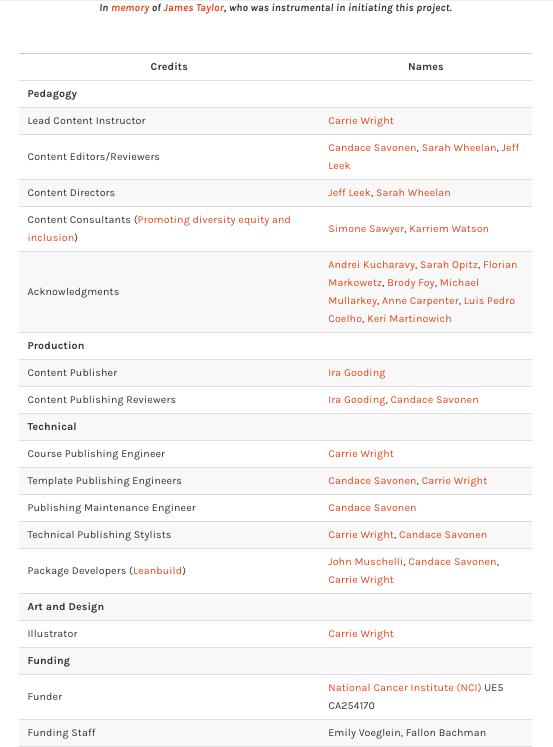
Please see the About section of the template for descriptions of how credits should be attributed for the course.
This is generated from the About.qmd or About.Rmd file. An About file will already be in your course from using our template. You will need to do the following steps to update it for your course:
- Fill out author names for the various roles where applicable.
- Delete lines for roles that are not applicable.
- Make sure roles grammatically match names. If there are multiple people include the “s” in the role name where applicable and remove the parentheses. If only one person is appropriate for a given role remove “(s)” from the role name.
- Ensure that each row has “|” around each cell value.
Example Table:
The table should be added and filled in using Markdown table format.
|Credits|Names|
|-------|-----|
|Lead Content Instructor|FirstName LastName|
Links to personal websites can be added below the table to make it easier to read.
|Credits|Names|
|-------|-----|
|Lead Content Instructor|[FirstName LastName]|

<!-- Author information -->

[FirstName LastName]: link to personal website
Required credit rows to add
Use these row sets as a checklist. Start with the rows for all courses, then add the Johns Hopkins or ITCR rows if they apply to your course.
1. All courses
These rows should be included for all courses:
|Template Publishing Engineers|[Candace Savonen], [Carrie Wright], [Ava Hoffman]|
|Publishing Maintenance Engineer|[Candace Savonen]|
|Technical Publishing Stylists|[Carrie Wright], [Ava Hoffman], [Candace Savonen]|
|Package Developers ([ottrpal]) [Candace Savonen], [Ava Hoffman], [Howard Baek], [Kate Isaac], [Carrie Wright], [John Muschelli]|

<!-- Author information -->

[John Muschelli]: https://johnmuschelli.com/
[Candace Savonen]: https://www.cansavvy.com/
[Carrie Wright]: https://carriewright11.github.io/
[Ava Hoffman]: https://www.avahoffman.com/
[Howard Baek]: https://www.linkedin.com/in/howard-baik/
[Kate Isaac]: https://kweav.github.io/

<!-- Links -->

[ottrpal]: https://github.com/ottrproject/ottrpal
Credit role reference
Use this table to choose contributor credit labels and categories for your course website.
| Credit Label | Order | Role Description | Credit Category |
|---|---|---|---|
| Production Organization | 1A | Johns Hopkins DaSL | No category |
| Lead Content Instructor | 2B | This person contributes to several roles and takes on a lion’s share of the overall effort. | Pedagogy |
| Lecturer | 2C | This person delivers the course online. | Pedagogy |
| Content Author | 2D | This person writes content but is not a lead developer. Authors are listed based on the amount of content they write, otherwise they are listed in alphabetical order. If someone wrote less than a chapter’s worth of content, then they are a contributor. | Pedagogy |
| Content Contributor | 2E | This person writes some content, but less than the amount of a chapter; otherwise they are an author. | Pedagogy |
| Content Consultant | 2F | This person provides specialized feedback about specific aspects of content and makes high-level suggestions, but does not write or edit the content. If they do, they are listed as an editor and/or contributor. | Pedagogy |
| Content Idea Contributor | 2G | This person helps come up with the idea for the content. | Pedagogy |
| Content Editor | 2H | This person edits but does not otherwise contribute to content. | Pedagogy |
| Content Director | 2I | This person helps guide the direction of the course development. | Pedagogy |
| Content Publisher | 3A | This person helps with the publishing platform work. | Production |
| Content Reviewer | 3B | This person checks the overall content and aesthetics. | Production |
| Course Publishing Engineer | 4A | This person helps with the code for the technical aspects related to the specific course generation. | Technical |
| Template Publishing Engineer | 4B | This person helped create the template. | Technical |
| Publishing Maintenance Engineer | 4C | This person helped with GitHub Actions and technical processes over time. | Technical |
| Technical Publishing Stylist | 4D | This person assisted with technical design elements, like CSS code. | Technical |
| Packages | 4E | This person helps create packages used to create the course. | Technical |
| Illustrator | 5A | This person helps create graphics for the course. | Art and Design |
| Figure Artist | 5B | This person helps create figures or plots for the course using code. | Art and Design |
| Videographer | 5C | This person helps film videos for the course. | Art and Design |
| Videography Editor | 5D | This person helps edit video files for the course. | Art and Design |
| Funder | 6A | This is where grant funding and similar funding sources can be indicated. | Funding |
| Funding Staff Member | 6C | This person helps manage the money needed to produce the content. | Funding |
| Support Staff Member | 7A | This person assists in some official way but does not fit other categories. | Support |
| Acknowledgements | 8 | This person makes minimal but helpful contributions that do not fit other categories, such as inspiration. | Acknowledgements |
| In Memory | 9 | For content James Taylor worked on or helped start. | In Memory |
Adding the Credits table to Coursera
In Coursera, you can add the credits table URL as an ungraded plugin (the same as described here for adding chapter content). This should be added at the beginning of your course, right after the introduction.
Adding the Credits table to Leanpub
In Leanpub, make sure that your About.md file in your manuscript folder is listed in your Book.txt file and this Credits table will automatically be incorporated into your Leanpub course.
← Back to: Next Steps · Also see: Citing Sources · Customizing Style