Enroll for Sync Updates
Full setup guide with screenshots
The OTTR templates are always a work in progress. New features are added and bugs are smoothed out over time. Your feedback is greatly appreciated. When updates are made to non-content files (checks, automation), pull requests are automatically filed to downstream repositories made from the template.
Add jhudsl-robot as a collaborator
You can skip this step if your course is in the jhudsl or fhdsl organization.
To enable the full functionality of GitHub Actions, add jhudsl-robot as a collaborator with write access:
- In your repository, go to Settings > Collaborators & Teams and click Add people.
- Search for and add
jhudsl-robot. - If prompted, choose the Write option, then click Add jhudsl-robot to this repository.

Which sync file should you edit?
Add your repository name to the .github/sync.yml file of the OTTR template you created your repository from:
- OTTR_Template sync file — for R Markdown courses
- OTTR_Template_Website sync file — for websites
- OTTR_Quizzes sync file — for quizzes
If you are not part of the jhudsl or fhdsl GitHub organization
Use one of these options:
- Google Form — submit your organization/username and repo name in the OTTR Feedback Google Form and we’ll make the edit for you.
- Open an issue — use the links in the table below and provide your repo info; we’ll update
sync.ymlfor you. - Fork and PR — fork the template repo, edit
sync.ymlon a new branch adding your repo name where it says#NEW REPO HERE#, commit, and open a pull request. Add a comment tagging@kweavso we see it.
If you are part of the jhudsl or fhdsl GitHub organization
- Open the relevant sync file above and click the pencil icon to edit.
- Add your repository name where it says
#NEW REPO HERE#, indented to match the other entries.
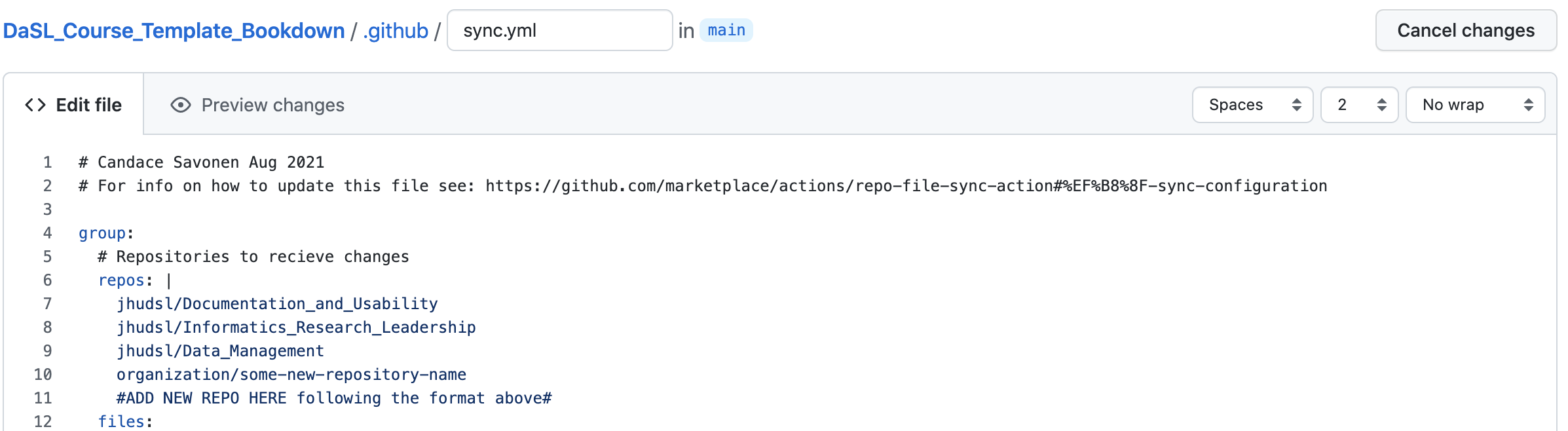
- Click Commit changes…, type
Add new repository to syncas the commit message, and choose Create a new branch. - Click Propose changes, then open a pull request and request
@kweavas a reviewer.
| Repository | Issue Links |
|---|---|
| OTTR_Template | General issue · Add new repo to sync · Update repo info in sync |
| OTTR_Quizzes | Open an issue |
| OTTR_Template_Website | General issue · Add new repo to sync |
If you have any questions about these updates or files, please tag @kweav or @carriewright11.
← Back to: Next Steps · Continue with: Customizing Style→