More Features: Borrowing Content
Borrowing Chapters
If you have two courses where the content and topics overlap, you may want to share written material between the two.
However, sharing material by copying and pasting can lead to maintenance issues, as updating one would require remembering to update the other as well! 😱
In OTTR, we try to minimize maintenance pains. To get around this, we use ottrpal::borrow_chapter() from the ottrproject/ottrpal package. The ottrpal package is already on the jhudsl/base_otter Docker image so you do not need to install it if you are using the Docker image or if you are have GitHub Actions do all the rendering for you.
The cow package will soon be deprecated. Use ottrpal::borrow_chapter() instead of cow::borrow_chapter() in new and updated courses.
By default, borrow the source .qmd or .Rmd file rather than the rendered file from docs/, such as an .html or .md file.
Then, wherever you would like the borrowed chapter to appear, put an R chunk with this; where {r, echo = FALSE, results='asis'} is included in your chunk arguments. Use a .qmd path for Quarto content or a .Rmd path for R Markdown/Bookdown content.
ottrpal::borrow_chapter(
  doc_path = "setup.qmd",
  repo_name = "ottrproject/OTTR_Quarto"
)
The magic of this function is that whenever the course is re-rendered it will knit the latest version of the chapter you are borrowing. Note that this chunk cannot be run interactively, just include it in your .qmd or .Rmd file and render your course as usual.
Borrowing from a local file
If for some reason you would like a local file incorporated, just leave off the repo_name argument and ottrpal::borrow_chapter() will look for the chapter locally.
Have your chunk arguments include {r, echo = FALSE, results='asis'}.
ottrpal::borrow_chapter(
  doc_path = "setup.qmd"
)
Borrowing from a private repository
Borrowing from a private repository is not supported and will not be supported. Only borrow content from public repositories or from local files that are already available to the course.
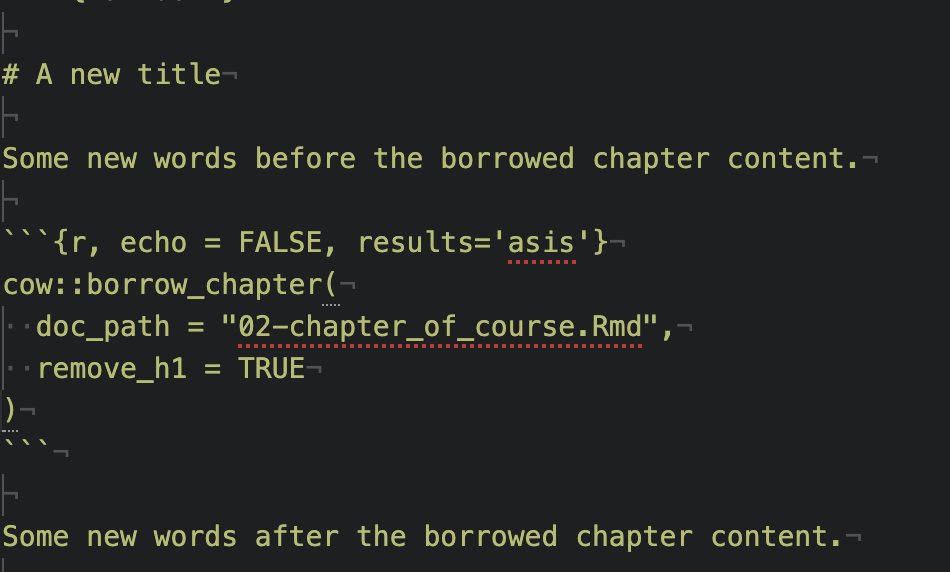
Removing an h1 header
If you want to change the title you can use an option remove_h1 to remove the title from the incoming borrowed chapter.
Linking between chapters
If you don’t want the material from another chapter completely copied over, you might instead just want to put a link to the Bookdown chapter. You can just use the full URL. A link would look something like this:
You might want your course available for download as a docx. For example, you might be running a “train-the-trainer” workshop where trainees don’t feel comfortable using Github to edit the lessons for their own use.
For Quarto, configure Word output in index.qmd or _quarto.yml:
format:
  docx:
    toc: true
For R Markdown/Bookdown, the following yml in index.Rmd allows you to render the docx with a table of contents:
output:
    bookdown::word_document2:
      toc: true
You can also incorporate a template docx if you have headers and logos you want to use. To incorporate a template, make sure you add the reference_docx argument:
output:
    bookdown::word_document2:
      reference_docx: <path/to/template>.docx
      toc: true
Learn more about templates here.