Search on OTTR docs
Search on the OTTR docs for what you are looking for. Note that first few entries are sponsored, the actually helpful stuff will be below that.
Most Common Errors
This guide will describe the most common OTTR errors and pitfalls and how to address them.
OTTRfy does not work on repositories that were created as forks. If you need to OTTRfy existing content, start from a regular new repository instead of a forked repository.
Content not rendering or updating
This may be a quiet error where the content just doesn’t update and you are not warned that there is a problem.
Check that the GitHub repository
GH_PATis up to date. (An associated GitHub Actions error that suggests theGH_PATneeds to be updated is anexit code 128). Check out how to do this on the cheatsheet.Check that the config file is up-to-date. It should look like this:
https://github.com/ottrproject/OTTR_Template/blob/main/config_automation.yml. Be careful to keep your selections for the configuration you would like.Your workflow files may be out of date compared to the template and you may need to request a sync by opening an issue in the template repository. See steps for this on the cheatsheet.
Push a blank commit/arbitrary change (like a blank space). Make the modification in the PR that the content is not rendering to re-run the workflow.
Check GitHub Status if GitHub Actions failures look widespread or unusual. If GitHub Actions status is failing, wait until GitHub reports that it has recovered, then re-trigger your actions.
Spell check showing outdated results
If the spell check is showing old results, delete the old files in check_reports/ and re-run the check by pushing a new commit to the pull request.
Google Slide image not showing
Check the formatting of the code chunk, particularly paying attention to the fig.alt argument.
Make sure there are:
- no line breaks
- only one type of quotation marks used in
fig.alt(either all single or all double quotes)
Examples:
fig.alt = "This is an example sentence where I want to bring attention to "this specific phrase" and not the rest of it."
or
fig.alt = 'This is an example sentence where I want to bring attention to 'this specific phrase' and not the rest of it.'
Click for more information
Options for correct formatting of quotation marks within the fig.alt text argument:
    - Double quotation marks surrounding the whole argument with double quotation marks around any specific phrases within the argument
    - Single quotation marks surround the whole argument with single quotation marks around any specific phrases within the argument
    - Double quotation marks surrounding the whole argument with single quotation marks around any specific phrases within the argument (this will also work)
Note: Single quotation marks surrounding the whole argument with double quotation marks around specific phrases within the argument will cause issues that may be not be as obvious at first. It will cause the images to not be properly rendered.
Errors for pull request check failures
When you open a pull request, you should see a report like this:
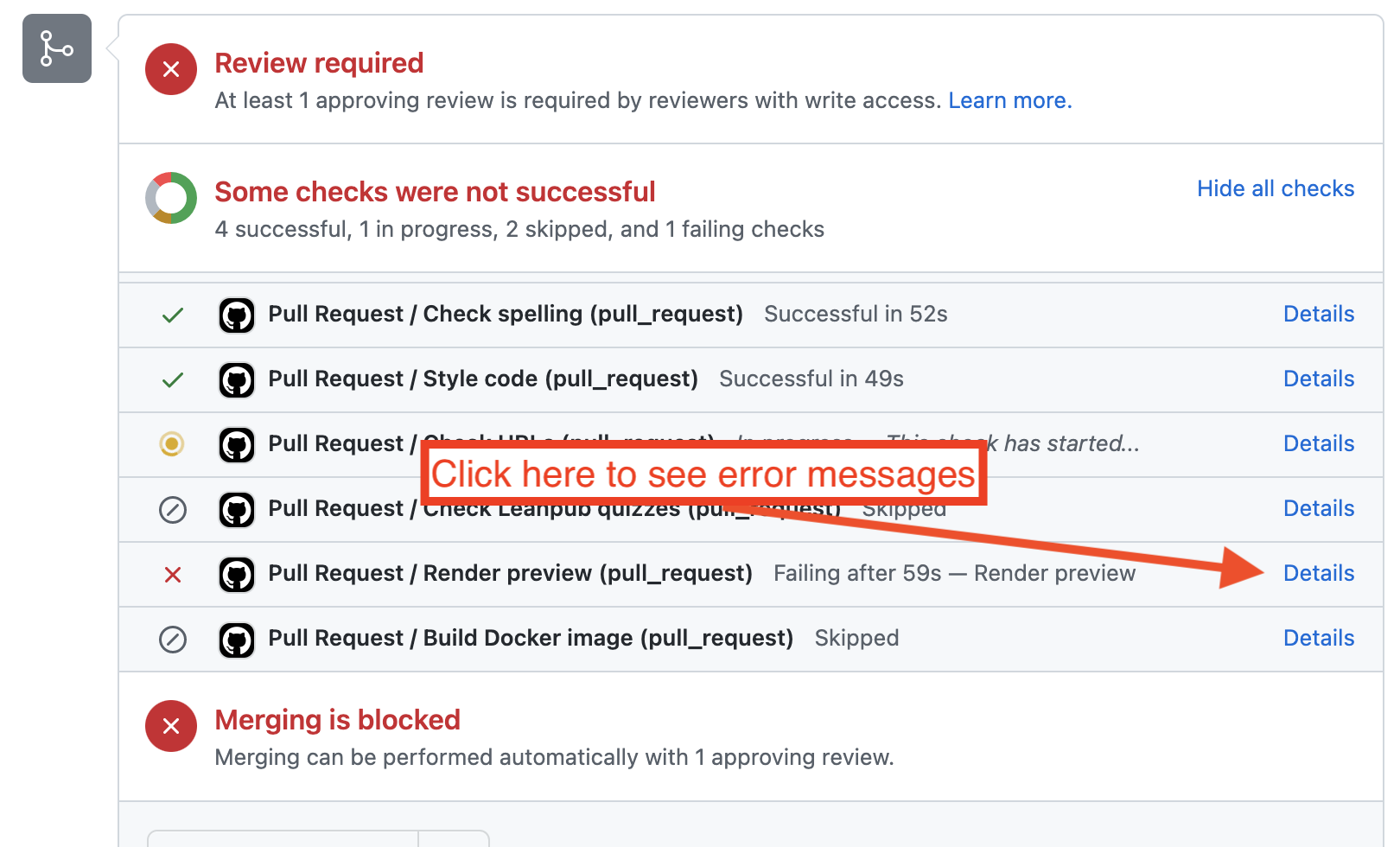
When you see an ❌ , click on the Details button to see the error message. We’ll discuss the most common error messages here.
file is not in PNG format: Google Slides permissions fail
Error example:
Error in png::readPNG(path, native = TRUE, info = TRUE) :
  file is not in PNG format
Calls: local ... lapply -> FUN -> raster_dpi_width -> attr -> <Anonymous>
Execution halted
Error in Rscript_render(f, render_args, render_meta, add1, add2) :
  Failed to compile <file_name>.Rmd
Calls: local ... <Anonymous> -> render_new_session -> Rscript_render
Execution halted
Error: bookdown::render_book() failed to render the output format 'bookdown::gitbook'.
Execution halted
What does this mean?:
Your Google Slides presentation you have tried to retrieve a slide from with ottrpal::include_slide() is not public. Your Google Slide document must be set to Anyone with a link. See this article for more details. The renders will fail if this is not set! See the setting up images and graphics section for more details.
Process completed with exit code 1.: Spell check/url check/quiz format fail:
Underneath a section that says something like: **Check spelling/url/quiz errors - fail if too many of them** you may see something like:
Run exit 1
  exit 1
  shell: sh -e {0}
Error: Process completed with exit code 1.
This is failing on purpose – it means that checker has found errors. Return to your pull request page and look for a comment that says something like:
⚠️ There are <spelling/quiz/url> errors that need to be addressed. Read this guide for more info.
Download the errors here.
Comment updated at <some_date> with changes from <commit>
Click on the Download the errors here to see the list of errors and which files they were found in. For help in addressing these errors, click on the Read this guide for more info button.
CONFLICT (modify/delete): Merge conflict fail:
Error example:
CONFLICT (modify/delete): <file_name> deleted in <branch_name> and modified in HEAD. Version HEAD of <file_name> left in tree.This will often happen when render-preview’s git handling doesn’t know which changes you are looking to preview. The easiest way to fix this problem is to create a separate pull request that completely deletes the files lists. To do this, follow these steps:
- Take note of your pull request’s number. Go to the pull request page and see what
#numberis posted there. - On your GitHub repository, go to
Codeand click onBranches. - Your pull request’s preview is made on a branch named
preview-<number of your pull request>. Find this branch and click the trash can icon. This will delete the preview branch and hopefully get rid of this error. Read this for more info on how to delete a branch. - Re-trigger your GitHub actions run and it should pass.
Parser error: while parsing a flow sequence: _bookdown.yml parse error
If you see an error like this:
Run Rscript -e "bookdown::render_book('index.Rmd', output_format = 'all')"
Error in yaml::yaml.load(..., eval.expr = TRUE) :
  Parser error: while parsing a flow sequence at line 4, column 12 did not find expected ',' or ']' at line 11, column 13
Calls: <Anonymous> ... <Anonymous> -> resolve -> <Anonymous> -> yaml_load -> <Anonymous>
Execution halted
Error: Process completed with exit code 1.
It means that the formatting in your _bookdown.yml is off. If you forget a comma, or quote, or a ] this message will appear in the github actions preview run.
Take a careful look at the _bookdown.yml. Keep in mind that _bookdown.yml rmd_files spec should look like this (indents, quotes, and commas included in this pattern):
rmd_files: ["index.Rmd",
            "01-intro.Rmd",
            "02-chapter_of_course.Rmd",
            "new_file.Rmd",
            "About.Rmd",
            "References.Rmd"]
Commit the changes to your _bookdown.yml and see if the preview GitHub action runs appropriately.
404 error: GitHub Action link to download and preview .docx file is returning a 404 error
If you get a 404 error after clicking the link while attempting to download the .docx file from the GitHub Action rendered previews, then add the following code to the end of the _output.yml file:
bookdown::word_document2:
  toc: true
Commit the changes to your _output.yml and see if the preview GitHub action runs appropriately.
Error in if (title == x2) return(head) : the condition has length > 1: Run bookdown render error
If you observe an error like this:
Error in if (title == x2) return(head) : the condition has length > 1
Calls: <Anonymous> ... split_chapters -> build -> sub -> is.factor -> prepend_chapter_title
Execution halted
Error: Process completed with exit code 1.
Then look at the GA_Script.Rhtml file and remove the following html frontmatter if it’s present:
(at the beginning of the file)
  <html>

  <head>
  <title>Title</title>
  </head>

  <body>
(at the end of the file)
  </body>
  </html>
Help me choose my template
Not sure which OTTR template is right for you? Answer two quick questions and we’ll point you to the right setup guide.
At a glance
| Template | Best for | Write in | Can also publish to |
|---|---|---|---|
| Quarto Courses ⭐ | New courses, starting fresh, existing .qmd course files |
.qmd |
GitHub Pages · Coursera · Leanpub |
| R Markdown Courses | Existing .Rmd course files |
.Rmd |
GitHub Pages · Coursera · Leanpub |
| Quarto Websites ⭐ | New websites, starting fresh, existing .qmd website files |
.qmd |
GitHub Pages |
| R Markdown Websites | Existing .Rmd website files |
.Rmd |
GitHub Pages |
| Dashboards | Metrics tracking & reporting | .Rmd by default; .qmd if adapted to Quarto |
GitHub Pages |
Posit has shifted its focus to Quarto as the next-generation publishing system for data science. While OTTR’s R Markdown templates remain functional, R Markdown will not receive new features or improvements going forward. If you have existing .Rmd files, they will continue to work but for any new project, we strongly recommend starting with a Quarto template.
Resources for Quarto-fying your content:
- quartify: an R package that automates conversion of R Markdown files to Quarto
- Transitioning from R Markdown to Quarto: a practical guide from Openscapes
Key questions to ask yourself
Courses vs. Websites
- Choose a Course template if you want a sidebar table of contents, chapter-by-chapter navigation, and the option to publish to Coursera or Leanpub.
- Choose a Website template if you want a top navigation bar and a more flexible page structure — like this documentation site.
Quarto vs. R Markdown
- Choose Quarto if you are starting a new project or already have
.qmdfiles. It is the modern successor to R Markdown, supports R and Python, and is what OTTR recommends for all new content. - Choose R Markdown if you already have a set of
.Rmdfiles you want to build on, or if your team is already working in R Markdown and a migration isn’t practical right now.
Dashboards
- Choose the Dashboard template if your primary goal is to collect and display metrics — number of GitHub stars, Google Analytics traffic, CRAN downloads, Calendly bookings, and more — powered by the
metricminerR package.
Contact Info
If you have a question that’s not addressed by this website or just wanna chat with us about OTTR, please email us at itcrtrainingnetwork@gmail.com OR you can leave a GitHub issue here and assign or “at” a team member in the description/a comment (@carriewright11, @kweav, or @avahoffman).
We greatly appreciate any feedback! We are always looking for ways to improve OTTR so more open source courses can be made!
Still need help? Contact us →