Style
Navigation bar
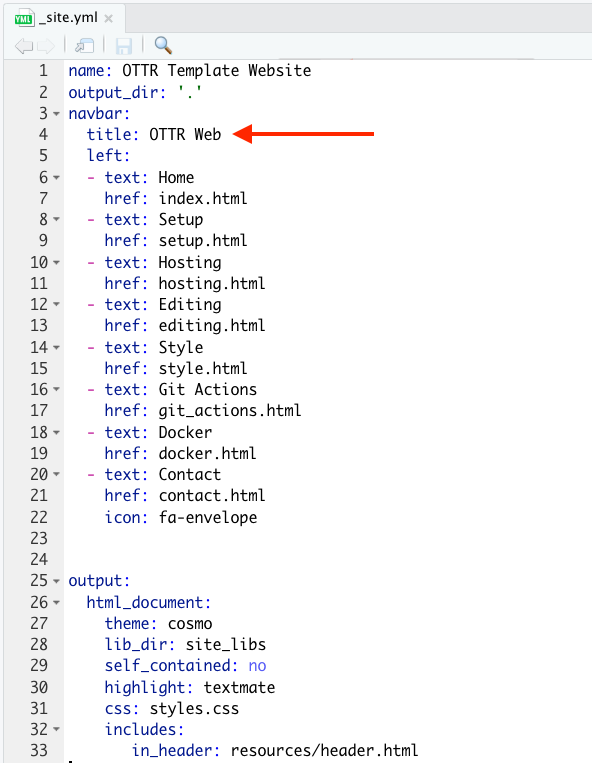
To change the part of the navigation bar that says “OTTR Web”, modify
the title within the _site.yml file.
Overall theme
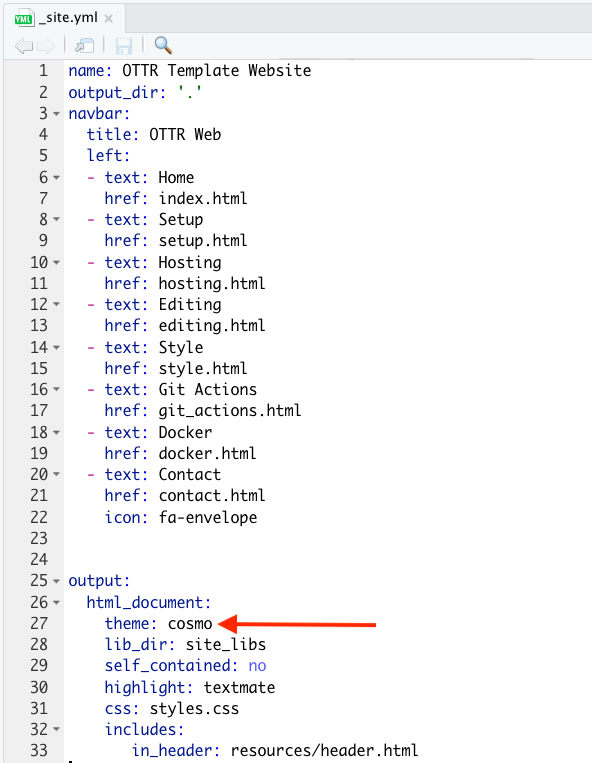
To change the color scheme/fonts of the website modify the
theme in the _site.yml file (see here for
options):
Change the favicon
The small image that shows up on the browser can also be changed.
You can make a small image to replace the existing one by going to https://favicon.io/favicon-converter/ and uploading an image that you would like.
Next, simply replace the image called favicon.ico in the
images directory within the resources
directory with the image you just created and downloaded from the
favicon converter website.
Additional changes
To make additional changes to the style, you can modify the
styles.css file with css code. This website has great information
about css code.
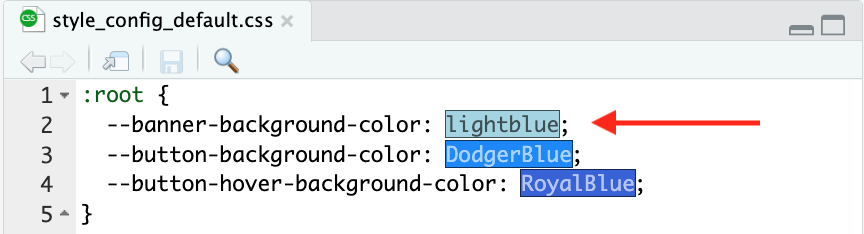
As an example if you wanted to change the color of the blue line to
green you could change --banner-background-color in the
assets/style_config_default.css file from
lightblue to lightgreen. You can also use a
hex color code like those that can be found at this website, such as
#00FF9E to get a specific shade.
The template also includes examples for centered text and a button on
the home page. You can change the button colors with
--button-background-color and
--button-hover-background-color in
assets/style_config_default.css.
Note that if you change the css file with a new element that is not
already defined like body then you would need to do it as
done with the banner element. This was then added to the
index.Rmd file by using:
<div class = "banner">
Banner text!
</div>
Also checkout the R Markdown cheatsheet for more customization of the pages.